
I always felt there should be an easier way to pull structured data from websites. Not by writing scripts. Not by copying and pasting rows for hours. Just a simple way to grab what I was already seeing on the screen.
So when I came across a Chrome extension that claimed to do this inside the browser, I decided to test it on real pages. Product listings, review pages, contact sections. I did not expect it to work this smoothly.
Here is what stood out once I actually used it.
The Problem I Was Trying to Solve First
If you have ever tried moving website data into a spreadsheet, you know how quickly things fall apart. Tables lose their shape. Lists turn messy. Important details hide inside page layouts.
That frustration was the starting point. I was not looking for a fancy scraping setup. I just wanted clean, usable data without extra steps.
What This Chrome Extension Actually Does
Ultimate Web Scraper works directly on the page you are viewing. Instead of dealing with code or complex settings, you select elements visually.
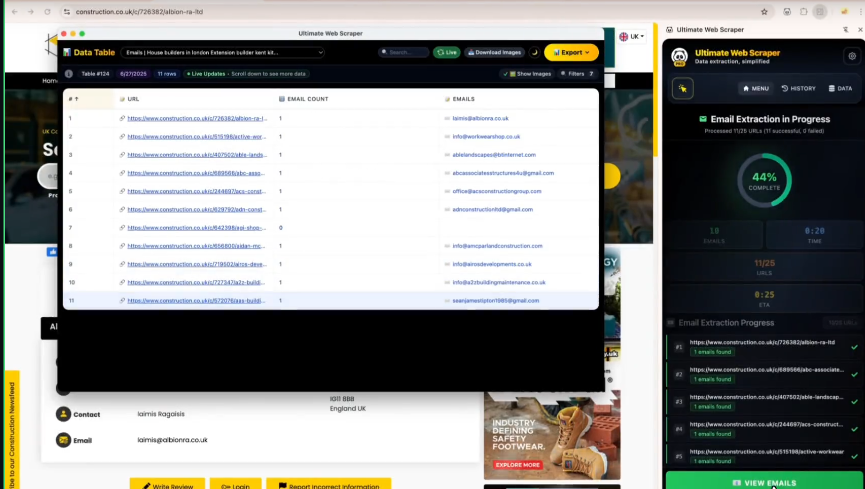
What made the experience feel different is that it behaves like a natural extension of browsing. You hover, click, adjust, and the data is prepared for export. No switching tools. No technical setup.
What Surprised Me When I Tested It
The first test was a product page with prices spread across multiple pages. I selected the table, made a few small adjustments, and downloaded the data. The structure stayed intact. Pagination worked without extra effort.
That was the moment I realized this was more than a simple copy tool.
On another site, I tested it on review content and contact sections. It surfaced email addresses and structured text that would have taken much longer to collect manually. The exported file was clean enough to use immediately.
Who This Kind of Tool Makes Sense For
As I kept experimenting, the use cases became obvious.
This is useful if you regularly work with online data but do not want to depend on developers for every task. Marketers gathering leads, researchers tracking information changes, eCommerce sellers analyzing competitor listings, and analysts organizing web data can all save time here.
It works best on structured pages where patterns repeat and the intent is clear.
A Few Things Worth Keeping in Mind
This is not a tool you use carelessly. Some advanced features require a paid plan, and scraping should always be done responsibly. Websites have terms, and respecting them matters.
I found it most effective when used with intention, not as a way to grab everything blindly.
What This Experiment Taught Me
What stayed with me after testing this extension was not just the time saved. It was how much simpler data collection felt when the tool matched the way I already browse the web.
You do not always need complex scripts or expensive software. Sometimes, having the right tool inside your browser changes how you approach the problem entirely.
In the end, it was not about one powerful solution, but about using simple tools thoughtfully and letting experimentation guide the process.

Cody Scott
Cody Scott is a passionate content writer at AISEOToolsHub and an AI News Expert, dedicated to exploring the latest advancements in artificial intelligence. He specializes in providing up-to-date insights on new AI tools and technologies while sharing his personal experiences and practical tips for leveraging AI in content creation and digital marketing